Enter manual measurements with Scoresheet
Record test results by hand for many athletes at once, such as body weight or a tested 1RM, saved as manual measurements at one date and time.
Scoresheet answers “What did you measure?” It is a spreadsheet for entering values by hand: athletes in rows, metrics in columns, all saved at one date and time. Use it on a testing day, for a weekly weigh-in, or to bring in results measured without a Vitruve device.
Open Labs → Scoresheet on a window 1024 px or wider.
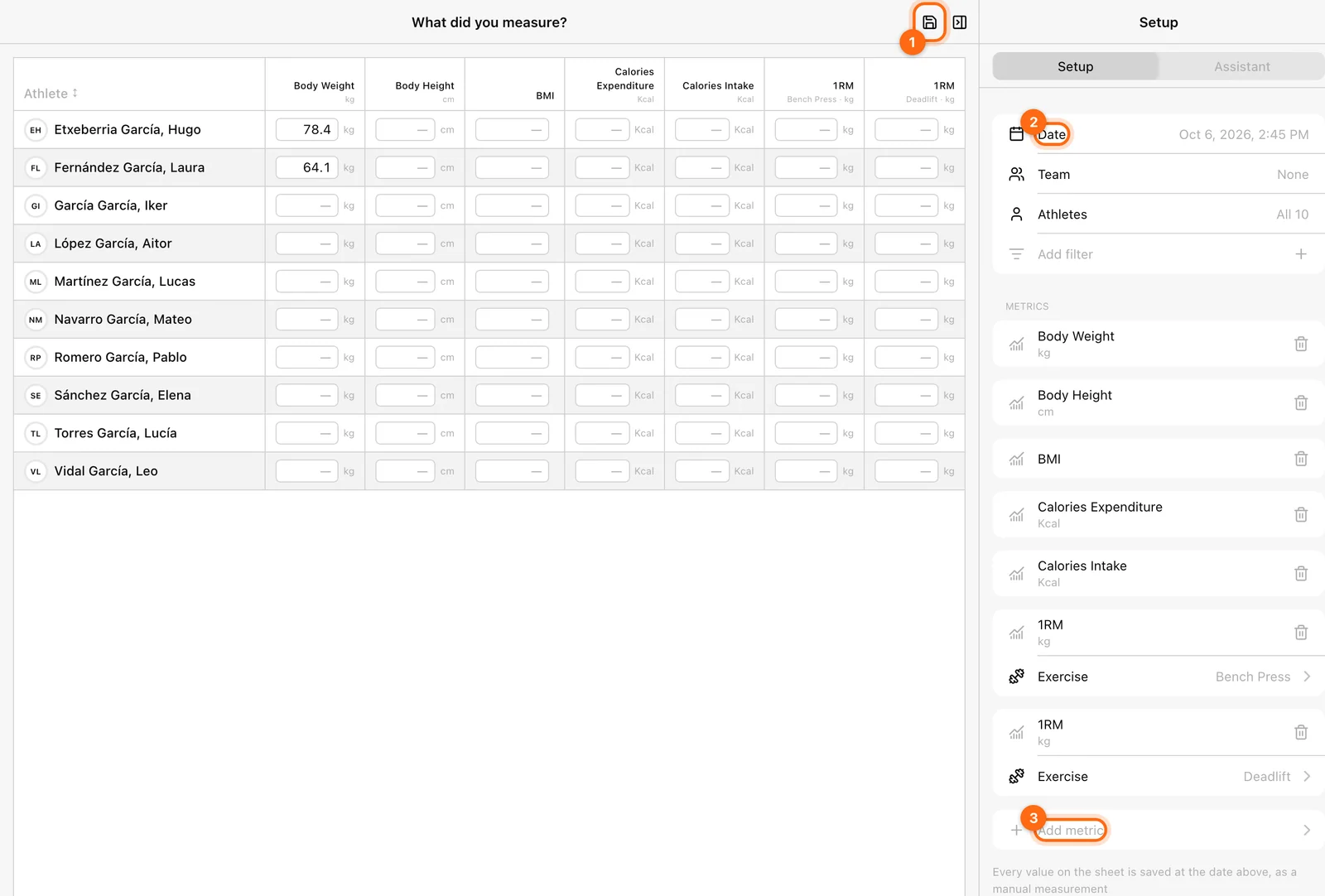
Set the sheet up
Check the date and time
Date stamps every value on the sheet. It opens on now each time; change it when you are entering results from an earlier session. It cannot be in the future.
Choose the athletes
Choose a Team or Athletes, and any athlete filters. Selecting nobody puts the whole roster on the sheet.
Choose the columns
Under Metrics, use Add metric for each column, up to twelve. For a metric measured per exercise, such as 1RM, choose the Exercise too. Until you do, the column header says Choose an exercise and its cells are locked.
The sheet starts with body weight, body height, BMI, calories expenditure, calories intake, bench press 1RM, and deadlift 1RM. Remove the columns you did not measure. Your athletes and columns are remembered in this browser; the date and the values you type are not.
Enter and save
- Type each value in your display units (kg or lb, cm or in); the unit is shown beside the cell. It is converted when saved.
- Leave a cell empty when you did not measure it. Empty is not zero.
- Select Save in the header. It appears once at least one valid value is filled in.
- Wait for Values saved. The saved values clear from the sheet.
The save is all or nothing: if any value is refused, none are saved and the message says why, for example a date in the future or an athlete you do not coach.
Save before you leave
Typed values are not kept anywhere until you save. Leaving the page or closing the tab loses them.
What gets stored
Each value becomes a manual measurement for that athlete at the sheet’s date and time. It is not a workout: there are no sets or repetitions. In Labs, manual values count like any other reading, and you can isolate them with the Data source → Manually filter (see Metrics and calculations). On profile cards they show as Entered manually.
A manually entered 1RM is your measurement, not a lift the encoder recorded.
Corrections
Scoresheet only adds values. It does not show values already saved, and it cannot edit or delete them. Saving the same sheet twice creates duplicates. Check the date, athletes, and units before you select Save. If you saved a wrong value, contact support with the athlete, metric, and date.
For one athlete’s body weight or height, the athlete’s profile has its own add prompts. See Body measurements.
If the sheet is empty
- Nothing to fill in yet: add the metrics you measured in Setup.
- No athletes on the sheet: choose a team or athletes.
- No Save button: no cell holds a valid number yet.