Get help from the Vitruve team
Send a focused support request with the context, reproduction steps, and preserved workout data that make a problem easier to resolve.
If you have not found the answer in these guides or the Frequently asked questions, contact a person on the support team. They get back to you by email.
Choose how to contact support
- Email: support@vitruve.fit.
- Contact form: write to the support team from the Vitruve contact page. The reply comes by email.
- Support-site chat: on support.vitruve.fit, select the purple icon in the bottom-right corner to open a ticket.
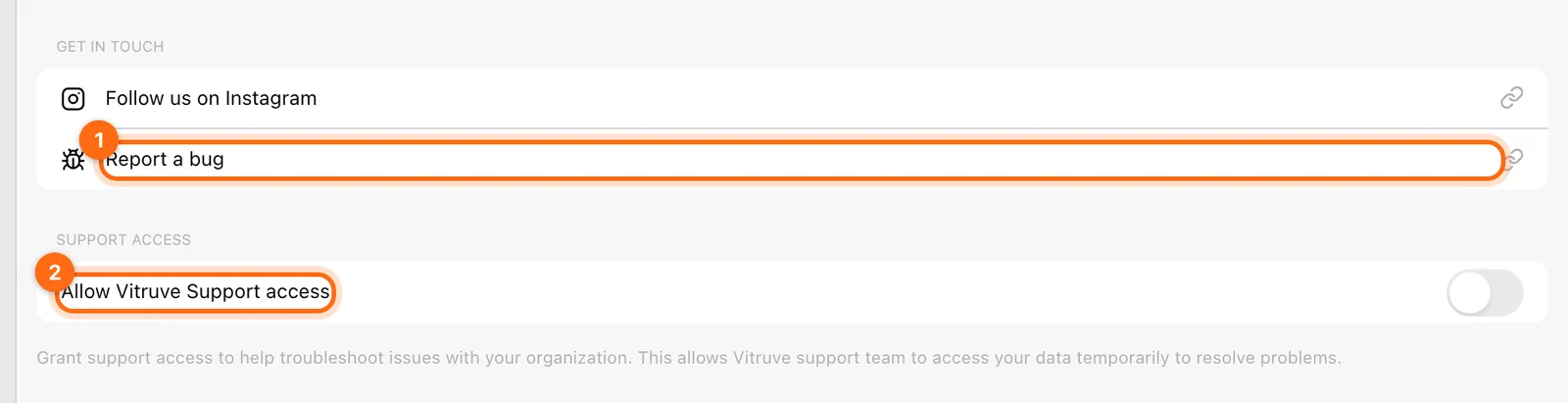
- From the app: open Help from the web question-mark control or More → Help on mobile. Its Report a bug link opens the support site.
The team responds to software and hardware reports within 24 hours.
Pick the right kind of report
| Problem | Examples | Where to start |
|---|---|---|
| Software | Bugs, malfunctions, an error message, missing data, or a missing feature | This page: send the context below |
| Hardware | A device that is broken, damaged, or malfunctioning | Report a broken or faulty device |
| Order or shipping | Order status, invoices, defective or missing items | Report an order or shipping problem |
| Return, refund, or repair | A device return within 30 days, a refund, or a warranty repair | Returns, refunds, and warranty |
| Subscription or billing | Activation, renewal, cancellation, or an invoice | Plans and billing or Invoices |
For a missing feature, describe what you are trying to do, who needs it (athlete, coach, or owner), and how you do it today. That helps the team understand the request even if the feature does not exist yet.
Send the context in the first message
Include:
- Account email and organization name.
- Your role and whether Coach Mode is on.
- Athlete, workout/program name, and approximate date/time with timezone.
- Device model and OS; app version or browser name/version.
- The screen you used and the exact error message.
- What you expected, what happened, and which checks you tried.
- Whether it also happens on another device or only on the original recording device.
For a connection issue, include the hardware model/identifier and whether it appears, connects, and becomes active. For physical damage or a device fault, add photos or a short video and your order details as described in Report a broken or faulty device.
Preserve a pending workout
If the issue concerns missing or blocked saves, open Training → cloud button → Pending workouts → Download as JSON for the affected record. Keep the local copy and attach the recovery file to the support request if appropriate.
Avoid clearing storage or reinstalling before the session is confirmed uploaded or preserved. A screenshot can explain the message, but it does not replace the pending workout’s actual record.
A useful message template
Subject: [short symptom] — [organization]

Account email:
Organization / role / Coach Mode:
Device, OS, app or browser version:
Athlete and workout/program:
Date, time, timezone:

I expected:
What happened instead:
Exact error:

Steps to reproduce:
1.
2.
3.

Checks already tried:
Pending workout / JSON recovery file available:
Does another device show the data or the same problem?
Do not include passwords, verification/recovery codes, or integration/API keys. The context and reproduction details are enough to start investigating.
Allow support access when needed
The Owner can open Help → Allow Vitruve Support access. Enabling it invites support@vitruve.fit into the organization with support’s administrative access for investigation.
Use it when the support team needs to inspect the workspace, and tell them which organization and issue you mean. Turn it off afterward to remove/cancel that support access. This is separate from transferring ordinary ownership to another staff member.
Keep a reference
Include the title or link of the guide you followed and the step where the result differed. That makes it easier for the team to reproduce the issue and improve the instructions for the next user.
Report an order or shipping problem
Ask about order status, request an invoice, or report a defective or missing item, with the details support needs to resolve it by email.
Legacy apps
Find help for the retired Vitruve Teams, Vitruve Athlete, and original Speed4lifts apps, and see where each task lives in the current Vitruve app.