Labs
What Labs is, who can open it, and which view answers your question, from today’s squad check to one athlete’s load–velocity profile.
Labs is the web app’s analysis workspace. It brings together everything your athletes record in Vitruve (lifts with the encoder, jumps, sprints, reaction games, wellness answers, injuries, manual measurements, and wearable health data) and turns it into answers: who needs attention today, how the squad compares, and how one athlete is developing.
Labs report boards analyze your recorded data. Workouts are recorded in Training and become available to analysis after finishing and uploading; individual views have their own refresh timing. Scoresheet is the exception to read-only analysis: it lets you save manual measurement records.
Start with a useful coaching question
- First visit: follow Get your first useful answer from Labs, from scope and preset to a checked result.
- Make it a habit: use Labs in your coaching week for a readiness check, a weekly review, and an athlete’s end-of-block conversation.
Who can open the coaching workspace
You need all three:
- A plan that includes Labs. The free plan does not.
- The Owner or Coach role with permission to read athletes in the selected organization.
- Coach Mode turned on. This opens the squad workspace rather than your personal boards. See Coach Mode.
Athletes, One-plan users, and coaches with Coach Mode off get personal Overview, Trends, and Records pages when their plan includes Labs. Those pages are pinned to the signed-in user and do not expose team reports or group Ranks. See the personal Labs guide for the self-training experience.
How far back you can read depends on the plan. See Choose a plan, and keep the selected window within your organization’s access.
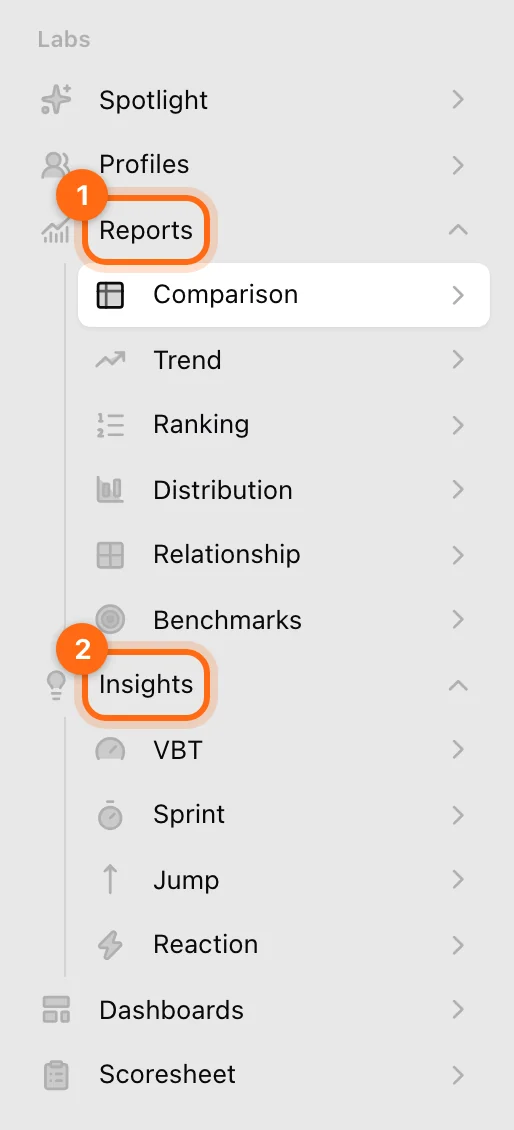
Choose the view for your question
| Question | Open | Guide |
|---|---|---|
| Who needs my attention today? | Reports → Comparison with the Readiness board preset | Health and readiness |
| How is one athlete doing across everything I track? | Profiles | Athlete profiles |
| Where does each athlete stand, metric by metric? | Reports → Comparison | Comparison |
| Who is improving, and who is dropping? | Reports → Trend | Trend |
| Who leads on each metric? | Reports → Ranking | Ranking |
| How spread out is the squad? | Reports → Distribution | Distribution |
| How do two qualities relate across the squad? | Reports → Relationship | Relationship |
| Where does each athlete stand within this squad, as a percentile? | Reports → Benchmarks | Benchmarks |
| What is happening inside one athlete’s lifts, sprints, jumps, or reaction games? | Insights | Insights |
| Can I keep several boards on one screen? | Dashboards | Dashboards |
| How do I enter test results by hand for the whole squad? | Scoresheet | Scoresheet |
Wellness, sleep, heart rate, and other health metrics can be used on any board. See Health and readiness.
How a Labs page works
Every Labs page follows the same pattern:
- The title is the question the page answers.
- Setup decides what is read: the date window, the athletes, and the metrics. On a screen 1200 px or wider it lives in a side panel you open with the panel button in the header; on narrower screens it sits at the top of the page.
- Header buttons: Download CSV (once there is something to export), Refresh where offered, and the Setup panel toggle.
- Assistant: where your plan and role include the AI assistant, a second tab next to Setup lets you ask questions about what is on screen.
Your setups and saved presets are kept in this browser on this device. They do not follow you to another computer or browser, and a link to a Labs page opens the page, not your setup. Dashboards are the exception: they are saved to your account.
Learn the controls once in Set up a Labs board, and how values are calculated in Metrics and calculations.
Screen size
Labs is built for a desktop. Comparison, Trend, Ranking, Relationship, Scoresheet, and the Trends and Records tabs of a profile need a window 1024 px or wider; below that they show “This analysis needs a wider screen”. Distribution, Benchmarks, the other profile tabs, and Insights also work on smaller screens.
Where the old Labs went
Older help articles describe Labs tabs named Overview, Performance, Health, and Teamsight, and a Me / My progress view. They have been replaced:
| Older view | Use now |
|---|---|
| Overview (trends, frequency, volume, intensity, readiness) | Trend, or an athlete’s Profile. |
| Performance (velocity, power, 1RM, velocity loss per exercise) | VBT Insights, or any report with an exercise selected. |
| Health (body, sleep, heart, mental, nutrition) | Health metrics on any board. See Health and readiness. |
| Teamsight (team averages, individual vs team) | The Reports group: Comparison through Benchmarks. |
| Me / My progress (One plan) | Personal Overview, Trends, and Records in the Labs sidebar, with plan access. |
If something looks wrong or empty, see Labs troubleshooting.
Export workouts and measurement data
Export a History date range, download one workout, email one set, or save a continuous monitor CSV without confusing their scopes.
Get your first useful answer from Labs
A guided first visit: choose a coaching question, scope a board, check its calculation, and verify the result against recorded work.