Wellness and monitoring
Collect questionnaire responses and maintain injury records alongside your athletes’ workouts.
Use these tools to keep athlete context alongside the work they record. Wellness responses and injury reports have their own review areas; VBT, jump, sprint, and reaction are workouts, documented in Training.
Choose the record you need
| You want to… | Start here | Review it in… |
|---|---|---|
| Record sleep, fatigue, stress, soreness, or other questionnaire responses | Wellness questionnaires | Wellness, or the associated workout’s Wellness view. |
| Record and update an injury report | Injury reports | Injury Reports. |
| Record an athlete’s body weight or height | Body measurements | Body Measurements. |
| Record jumps, runs, or reaction events | Workout modes | Workout History after finishing. |
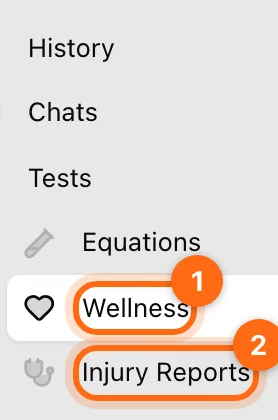
On the web, Wellness and Injury Reports sit in the sidebar's Tests group. Injury Reports appears there in Coach Mode.
Check the athlete before entering data
In Coach Mode, select the intended athlete. The current avatar is the person receiving the next entry. In personal mode, entries belong to your own context in the selected organization.
Bring wellness into training
Enable Wellness in Training Settings when you want the questionnaire at the start of workouts. It appears as a Wellness tab alongside Workout and Summary. Enabling the prompt does not change a jump or sprint into a different kind of record.
Keep interpretation tied to the original record
Check the question wording, response scale, athlete, date, and units. A recorded “Recovered” status does not rewrite a program; a body-weight entry is not an exercise 1RM. Use the corresponding program or training controls to make those separate changes.