Build and schedule training
Turn a movement into a prescribed workout, reuse it in a program, and deliver it through a dated live plan.
Builder connects reusable planning with the sessions your athletes actually see. Work from the top down if you know the whole program, or start with a single useful workout and reuse it.
Understand the pieces
Movement → exercise prescription → superset → block → workout → phase → program → live program
- A movement comes from the exercise library.
- A prescription adds sets and targets to that movement.
- A superset groups exercises together.
- A block organizes a part of a session.
- A workout is a complete session structure.
- A phase places workouts across a number of weeks.
- A program contains phases.
- A live program adds dates and athlete assignments.
Follow a planning path
| You want to… | Guide |
|---|---|
| Build a complete program step by step for the first time | Build your first program |
| Understand reusable structure and copying | Templates |
| Build a daily session or superset | Workouts and blocks |
| Prescribe sets, reps, load, velocity, fatigue, and rest | Prescriptions |
| Schedule workouts across phases | Programs and phases |
| Assign a dated plan to athletes | Live programs |
| Find planned and completed work on dates | Calendar |
| Find, favorite, or create a movement | Exercise library |
| Configure ROM, equations, and exercise-specific filters | Exercise settings |
| Use the assistant and review proposed changes | Vitruve Intelligence |
Where to open Builder
Web: sidebar → Builder. Templates is an expandable group, not a separate web page. Live Programs sits outside that group.
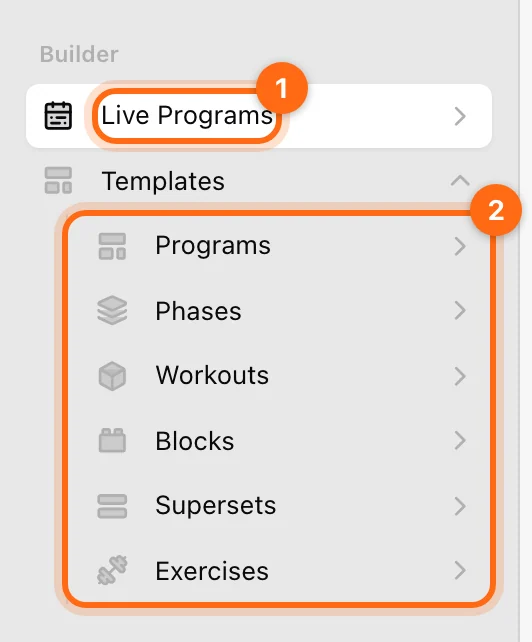
Mobile: open More → Builder, then the relevant template level or live-program area.
Creating and editing planning content requires Owner or Coach access and a plan that includes Builder. Athletes can view the planning content their access permits but do not manage coaching templates.
Fix AI assistant connection problems
What to do when an AI assistant can’t connect to Vitruve, keeps asking you to sign in, or says data isn’t visible.
Build your first program
Go step by step from exercise templates to supersets, blocks, workouts, phases, and a program, then assign it so athletes see it in their calendar.